Quick Links
👉 Chennai Info 👉 Sightseeing 👉 Chennai Constituencies 👉 Travel Guide 👉 Entertainments 👉 Home Care Tips
👉 MTC Bus Routes 👉 Around Chennai 👉 Areas in Chennai 👉 Experts Corner
👉 Chennai Helplines 👉 Hospitals 👉 Schools
👉 Malls in Chennai
👉 Resorts in Chennai
👉 Trade Information 👉 Hotels in Chennai 👉 ESI & PF Offices 👉 Water Suppliers 👉 Postal Information
👉 Lamination Services
👉 Join Rotary
👉 Astrology 2026
👉 Pilgrimage
👉 Chandrashtama 2026
👉 Girivalam Dates 2026
👉 Amavasya Dates 2026
👉 Subha Muhurthams
👉 Navagraha Temples
👉 Calendar 2026
👉 Festivals 👉 Vasthu Dates
👉 Mobile App
👉 Tamil Nadu MLAs List
👉 Church Timings 👉 Nuts 'n' Spices Places
👉 Government Holidays
👉 Health 👉 BMI Calculator
👉 Beauty Tips 👉 Ayurvedic Medicines
👉 Repair centers
👉 Tablets Price List
👉 Electronic Prices
👉 Electronic Dealers
👉 Infinitheism 👉 TV Program Schedule
👉 Rotary News

more links


...................................................................................................................................................................................................................................................................................

ON SCREEN KEYBOARD

An alternative keyboard in Windows. In case your keyboard or some keys stop working Microsoft provides you with an alternative way to type in using the mouse
To work this tool,  go to --> Start menu --> Select Run --> Type "OSK" --> Press OK
Then u can see.
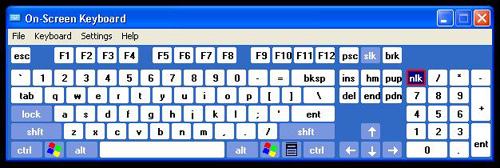
Open any application r editor (ex notepad) and start clicking the keys.